Logo Logo Logo Logo Logo
Knowledge Base
  • Home
  • Veracross
  • CushmanSchool.org
  • Cushman Email
  • Home
  • Veracross
  • CushmanSchool.org
  • Cushman Email

How can we help you?

Email and Communications

  • Troubleshooting Email

Windows and Chromebooks

  • Data Backup Guide
  • Setup Instructions for Windows Laptops (Students)
  • Setup Instructions for Chromebooks (Students)

iPads

  • iPad Wi-Fi
  • iPad Introduction
  • iPad Shortcuts
  • iPad Self Service
  • iPad Apple Pencil
  • iPad Camera
  • iPad AirDrop
  • iPad Zoom Backgrounds

MacBooks

  • MacBook Intro
  • MacBook AirDrop
  • MacBook Spotlight
  • Taking Screenshots on MacBooks
  • MacBook Keyboard Shortcuts
  • Self Service on Macbooks
  • Macbooks Wi-Fi Tips
  • Night Shift on Macbooks
  • Data Backup Guide
  • Setup Instructions for MacBooks (Students)

Hardware and Equipment

  • Charger and Stylus Replacements
  • Home
  • Docs
  • Students & Parents
  • Windows and Chromebooks
  • Setup Instructions for Chromebooks (Students)
View Categories

Setup Instructions for Chromebooks (Students)

< 1 min read

Wi-Fi Connection & Computer Login #

Ensure your device is connected to the school Wi-Fi: CougarConnect or csGuest and then log in using your Cushman email address and password. Teachers have a copy of their students’ usernames and passwords.

Accesing School Platforms #

Veracross #

Navigate to https://portals-app.veracross.com/cushman/ and sign in with your Cushman credentials.

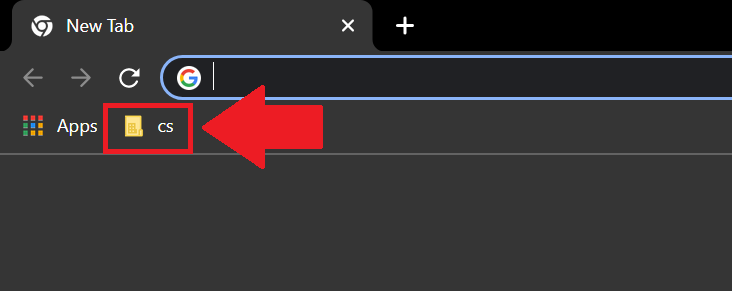
Tip: You can locate a direct link Veracross by clicking on the “cs” folder on your Google Chrome browser. See the screenshot below for reference. If you don’t see a bookmarks bar then hold down CTRL + SHIFT + B to make it visible.
If you have questions, please contact techissues@cushmanschool.org or the Elementary School Technology Teacher.

Google, Veracross
Was this helpful?
Updated on August 12, 2026
Setup Instructions for Windows Laptops (Students)Data Backup Guide
Table of Contents
  • Wi-Fi Connection & Computer Login
  • Accesing School Platforms
    • Veracross
Contact

+88 (0) 101 0000 000

youremail@yourdomain.com

198 West 21th Street, Suite 721
New York, NY 10010

Navigation
  • About Us
  • Support
Features
  • Data Analysis
  • High Speed
  • Backup
  • Live Support
Newsletter
Nunc hendrerit, tortor eu facilisis aliqua, risus nisl varius erat, et euismod.
[contact-form-7 id="83" html_class="cf7_custom_style_1"]

POWERED BY